| Go to: | Website home | 01 On-Line Directory | Book info |
01/W Floppy Disk Drive Repairs
| Disk Drive Topics | |
|---|---|
| Error Messages | Replacing the Floppy Disk Drive Which disk drive to use |
rev: 2020Jun05p0936
|
DD = double-density (720K) DOS = disk operating system FDD = floppy disk drive |
HD = high-density (1.4M) KB = K = kilobytes MB = M = megabytes |
SMF = Std. MIDI File = Standard MIDI File |
Overview
Before doing anything, look up any error messages you see in the Error table below. From that you should be able to get an idea of what the problem might be.
In the simplest case, you may have tried to read one type of disk using the wrong screen. If things look worse than that, cleaning the drive heads is a good thing to try, especially if your 01 has been in smokey places.
If you are really unlucky, the drive will have to be replaced. Check the text to see your options.
Other disk drive related pages on this site are:
- 01/W Disk Mode: About the options available when you press DISK on the 01 panel).
- 01/W Disk Topics: Information on many disk-related questions like using DD or HD floppies.
Disk Error Messages
If you try to access a floppy in your 01 and get an error message, here are some things to check:
| Message | Meaning |
|---|---|
| Data Error | This message means the data being read off the disk is bad. Although it is very unlikely, it is possible that the disk drive has gone bad and the drive itself has damaged the disk. If you insert a disk containing valued work, it could be destroyed. The manual recommends:
Use only new or empty double-sided disks until you know for certain your disk drive is not damaging disks. Now, more likely reasons you will get this error include:
|
| Disk Type Error |
1. The disk is DOS formatted and you're trying to access it as an 01-formatted disk (by using Page 1 or 2). 2. The disk is not for the 01/W series. |
| Drive Not Ready | There is no disk in the drive, or the disk is not properly or fully inserted. |
| Insufficient Memory | MIDI data files can't be loaded or saved because there isn't enough free sequencer memory. |
| Memory Overflow | While saving a MIDI file, the received data was more than 64K bytes. |
| No File | The specified file isn't on the disk. |
| Protected Disk | The write-protect tab on the disk is in the "protect" position (the hole is open). |
Computer Error Message
"System Error: Cannot read from drive A" (in Windows 3.1 - may be different in other versions). This can mean you inserted a 1.4M disk that was formatted for 720K. Cover the hole with tape or a sticker or something. (details here)
Cleaning the Heads
Quoting directly from the 01 Manual:
If the disk drive head becomes dirty, data errors may occur. Accumulated dirt can scratch the disk. Regular cleaning is important to avoid dirt buildup.
To clean the disk drive head, use a commercially available fluid-type cleaning disk for dual-sided drives.
Using a single-sided cleaning disk may damage the disk drive.
Cleaning Procedure
- Moisten the cleaning disk with cleaning fluid.
- Immediately insert the cleaning disk into the disk drive and execute a load operation. (Any type of load operation is ok.) An error message will appear.
- After approximately 10 seconds, press the eject button, and remove the cleaning disk.
- For approximately 5 minutes, do not use the disk drive. (Using the disk drive before the cleaning liquid has dried may cause malfunctions.)
- - - - -
That ends the quote from the manual. The same cleaning disk is used for DD and HD disk drives. Just make sure it's for a 2-sided floppy drive.
Replacing the Floppy Disk Drive
If Korg Does It
One user paid $237 to have a Korg repair center replace his drive. This price included the drive, installation, and tax. (99Dec)
A replacement drive by itself cost $183 from a New York Korg dealer (99Dec). This is consistent with the $200 figure that has been reported in the past. Teac was selling the same drive for about $35 (97Feb15).
If You Do It Yourself:
In theory, you should be able to replace the 01 FDD with any generic PC-type 720K drive. But reports of successful replacement by users, outside of an authorized repair shop, have been rare. What follows is information that has been posted to a couple of korg lists over the years. Feel free to e-mail your experiences to me.
Static Caution!
The floppy disk cable connects directly to static-sensitive circuits. I assure you from personal experience that walking across cheap nylon carpet in Chuck Taylor tennis shoes will create enough static to kill the mouse port on a computer simply by touching the mouse! If ever you open your 01 and expose the circuitry, take strict precautions against static or you may cause expensive damage.
Dis-Assembling the 01
I’ve posted step-by-step instructions for taking your 01 apart and putting it back together in the Sticky Key section. Click here to go there. While you have your 01 apart, you might as well check and/or fix any “lazy” keys.
Re-Assembling the 01
As I said above, instructions are elsewhere BUT before putting it back together, test that the drive works.
If the New Drive Doesn't Work
- Check that the ribbon cable going to the disk drive is not upside down.
- Make sure all cables are snug and not upside down.
Which Drive To Use
rev: 2020Jun10p0117
Korg USA once reported the Teac FD235HF and Teac 6500 (since replaced by the 7500 series) disk drives were generic replacements for the 01/W, T and I series keyboards. The problem is, since then, Teac made a LOT of versions of the FD235 with many jumper configurations. Your best bet is an older drive (before more jumper options were added). For the technically inclined here's what to look for ([thank Mario Baus for 2020 updated info!]:
- Find a drive which is selectable as DS0 (DS1 is standard), which is capable of reading DD-density,
- Find a drive where you can configure DiskReady as output on Pin34 (usually Drive change is indicated here; IBM-PC’s seem to require that diskchange signal here).
- The more jumpers a drive has, the better chance you have of getting it to work in the 01. But you may need to find the right data sheet to decode the jumpers. Visit TEAC FD datasheets here: https://hxc2001.com/download/datasheet/floppy/thirdparty/Teac/
Sources for replacement drives include:
- eBay (where a Teac FD235HF-C929 and FD235HF-6529 were found, one as recently as 2020May).
- "Parts Is Parts" (https://www.partsisparts.net/catalog), “the Authorized National Parts Distributor for Korg Parts”. Their website shows floppy drives may be available on request.
- In theory you should be able to replace the 01 FDD with any generic PC-type 720K drive. But reports of successful replacement by users, outside of an authorized repair shop, have been rare.
There are pins on these drives which must be connected together ("jumpered" is the term. A "jumper" is a wire connecting two points, allowing the signal to "jump" from one point to another.) A diagram was shown, which is reproduced below. In most cases, if not all, it seems the green light will stay on.
Users report these were original floppy drives in their 01s, but I haven't heard of any of these being found for replacement use:
- Alps Electric DFR 423F02A, reportedly compatible with Chinon FZ357.
- F4 QPR15 Sankyo 212168, reportedlyl NOT compatible with the TEAC FD235HF-4240.
- TEAC FD235HF7529
User Reports
Note: I can't keep current with all the sources and their quality – feel free to e-mail me your experiences.
I suggest that you contact the Korg 01 Users Group/list server (which is not connected with Korg, the company) to post your questions and experiences. This world-wide list has many smart and helpful members who may have recent experience with these repairs. (To subscribe, visit http://groups.yahoo.com/group/korg01w-list/.)
Chinon
A user successfully replaced the original Alps Electric DFR 423F02A drive with a
Chinon FZ357 from eBay. He attached two jumpers, but he didn't say which jumpers or
where. He did say the setting was "720KB Mode" and "Drive Select 0". The drive works,
but the green LED is always lit. [2002 Oct 16]
Teac
One reported successful replacement was a Teac FD235HF-6529 bought from Ebay.com
(sales@jimini.com) for $16. The jumpers were set as shown in the
table below and it worked.
Another user reports installing a Teac FD235HF-4240 that did NOT work. His original drive was an "F4 QPR15 Sankyo 212168 5 Vo, 25 A , 34-pin, 4-pin power, 720 2DD, 3.5". Korg offered to sell him a drive for $150. [99Nov20]
Can I replace the original 720K drive with a 1.4Meg drive?
It depends on the drive (see Which Drive to Use above). The Sony MPF 520-1 (a 1.44M drive) was reported as being successfully placed in an 01. It probably had a jumper setting that made it look and work like a 720K drive. It is unknown if other 1.4M FDDs will work in the 01W.
User Roymario reported jumper settings as follows: "If the drive face you You will notice 3 jumpers to the top right hand corner place jumper only on extreme right hand berge. This drive will do all function of a regular drive. The only catch being the front panel LED may never glow although the drive works perfectly."
Regardless of the drive, you will still be restricted to using 720K floppies. If you use a 1.4M floppy disk, it must be formatted to be 720K.
The 01 came with a 720K, double-sided floppy disk drive. The internal programming of the 01 expects to see this type of drive, and only this type. If you replace the 720K unit with something else (like a 1.4M drive), the internal programming wouldn't know how to operate the drive.
Some 1.4M drives may have a jumper or switch to set the drive to operate in 720K mode. In this case, the 01 should never know the difference.
About The Media/Diskettes
Which media? The Korg site stressed the “keyboards were designed to be used with Double Density Disks only. High density (HD) disks will not always work properly.”
Most IBM PCs had a 1.44M drive which uses 1.44M floppies. The 01 can't read floppies formatted for 1.44M, but the IBM could read 720K floppies if they were properly formatted.
All HD floppies had to have their hole covered after the replacement drive was installed. This means you must cover the holes in all HD floppies you use in this new drive, even old HD floppies that used to work without having the hole covered.
HD (1.4M) drives identify the floppy by looking for a square hole at one end. If it sees the hole, the drive automatically goes into 1.4M mode, and it won't read a floppy formatted for 720K. In this case, you must cover the hole with opaque tape (or something equivalent). This is important if you were using 1.4M floppies with the original 01 drive. That drive couldn't recognize your 1.4M floppy – it always assumed it was 720K. A replacement drive might know the difference, so you'll have to put tape on all your old 1.4M floppies.
Jumpers on the Teac Floppy Drives
If you get a Teac dixk drive, there are jumpers that must be correctly placed in order for the drive to work. Note that Teac 6500, FD235HF, and FD235HF-C929 configurations are different.
Teac 6500 and FD235HF Disk Drives
| Teac 6500 and FD235HF Disk Drives | |
|---|---|
| Jumper settings for 01/W, T, and I Series Keyboards | |
            3    2    1
           +-+  +------+
  o    o   |o|  |o    o|    G
           | |  +------+
           |o|   o    o     F
           +-+  +-+
            o   |o|   o     E
           +-+  | |
           |o|  |o|   o     D
           | |  +-+
           |o|   o    o     C
           +-+       +-+
            o    o   |o|    B
                     | |
            o    o   |o|    A
                     +-+
|
|
Note: This information was submitted via the internet and has not been personally confirmed by me. Use this information at your own risk. Please e-mail me if you find anything missing or wrong. [98Apr20]
User report: "This jumper configuration is the same for the older Korg DSS-1 except that the connector CN9A on KLM780 must be reversed for this application." [01Apr01eg]
Teac FD235HF-C929 Disk Drive: Jumpers on 12-pin Header
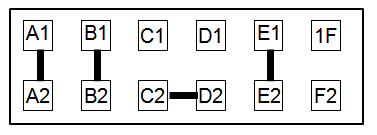
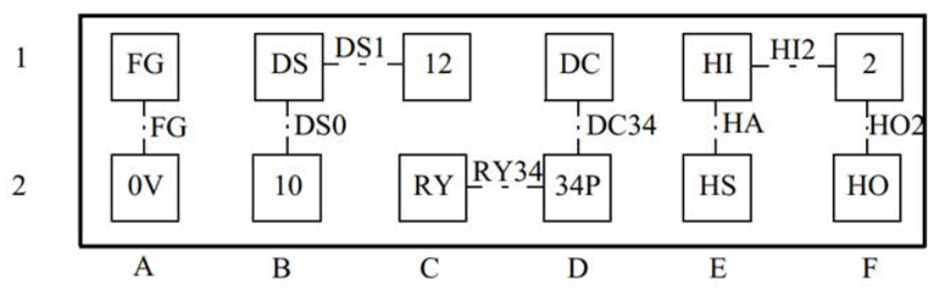
| Strap | Function |
|---|---|
| DS0 | DRIVE SELECT 0 input on pin 10 |
| DS1 | DRIVE SELECT 1 input on pin 12 |
| *RY34 | READY output on pin 34 |
| *DC34 | DISK CHANGE output on pin 34 |
| *HA | Density set automatically |
| *HI2 | Density set by HD IN in pin 2 |
| *HO2 | HD OUT output on pin 2 |
| FG | Short between FDD frame and DC 0v |
FDD Connector Pins
| Pin | Name | Direction | Description |
|---|---|---|---|
| 2 | unused REDWC- |
- to drive |
in original PC Density Select (in PC-AT?) |
| 4 | unused | - | not connected |
| 6 | unused | - | not connected |
| 8 | INDEX- | from drive | Index (one pulse each rotation) |
| 10 | MOTEA- | to drive | Motor Enable drive-A |
| 12 | DRVSB- | to drive | Drive Select drive-B |
| 14 | DRVSA- | to drive | Drive Select drive-A |
| 16 | MOTEB- | to drive | Motor Enable drive-B |
| 18 | DIR- | to drive | Stepper motor direction (0=towards spindle) |
| 20 | STEP- | to drive | Step pulse |
| 22 | WDATE- | to drive | Write Data |
| 24 | WGATE- | to drive | Write Enable |
| 26 | TRK00- | from drive | Track 0 (0=track 0) |
| 28 | WPT- | from drive | Write Protect (0=protected) |
| 30 | RDATA- | from drive | Read Data (pulse=flux change) |
| 32 | SIDE1- | to drive | Select Head 1(0=top, 1=bottom) |
| 34 | unused Ready(?) DSKCHG-? |
- ? to drive? |
in original PC (this I know) Drive Ready? (in PC-XT?) Disk Change (in PC-AT?) |
- All odd pins are GND, Ground.
- Motor/Drive "A" and "B" refer to drives in a 2-drive system. The 01 is said to work only with "A" enabled/selected. This is jumper-selectable on some drives. Labels may show A/B, DS0/DS1, 1/2, or some other way of identifying the two drives.
- All signals are active-low (0 = ground = true).
- All "to drive" signals are open-collector, terminated in the drive (except maybe MOTEA, which may have a 2K pullup at the driver end).
- Some signals may be selected by jumpers (like Drive A/B, pin 2, and pin 34).
- Some drive information may be available at www.teac.com. (None of my information came from this site.)
Hard Disk Drive
There is/was a company on the internet that advertises replacement drives for the 01, including a hard disk drive. I have no knowledge about the product, how it works, or how good it is. For information, visit their web site: Megafloppy (http://www.megafloppy.com) (The new link is http://www.liontracs.com, more specifically, http://www.lionstracs.com/WEBLIONS/megafloppy/megafloppy.html)
It looks like the Megafloppy is a hard disk drive that fits in the floppy slot of your 01. The hard drive is partitioned to look like "hundreds of floppies". The price is not viewable with my browser but is said to be expensive.
User Reports
I get emails from users who have worked with their floppy drives. I copy them here as they were sent to me. I can't verify any of what they say, so double-check everything on your own.
From PV of Reno, NV
My experience replacing the FDD in a Korg 01/W-FD (August 2014):
The original was an Alps DFR423E02A. I had absolutely no luck finding one on the internet. TEAC-6500, TEAC FD235HF-6529, and FD235HF7529 are also hard to find, or expensive. I tried a TEAC FD-235HF-C891. It didn't work, almost certainly because pin 34 is not configured to send the "READY" signal. I couldn't see any way to correct this problem.
I then purchased a Samsung SFD-321B. These seem to be cheap and easy to find on Ebay. I had to take off both sheet metal panels, and solder tiny wires (or you can probably just create a glob of solder) to short the RDY trace plugs (located near the square chip near the middle of the PCB) and the DS0 trace plugs (located near the 34-pin ribbon cable connector).
I also had to tear out a section in the middle of the plastic housing around the ribbon connector to accommodate the tab on the connector on the end of the ribbon cable. This is because it turns out (on my 01/W, anyway) that the connector is backwards for the Samsung SFD-321B. You can easily check which way your cable should go: On one of the two rows of pins, they are almost all GND and, hence shorted together. Use your ohmmeter/continuity tester to see which row on the FDD is GND pins, and also do the same check on the connector at the FDD end of the disconnected ribbon cable. Just make sure the GND pins on the FDD are going into the GND holes in the connector.
The ribbon cable header and the power in header are on opposite sides of the rear of the Samsung SFD-321B compared to the original FDD. Hence, I also had to remove the power wires from a wire holder inside the Korg in order to get enough slack on the wires to be able to attach the power connector to the power-in jack on the Samsung SFD-321B.
The new FDD is working fine except the LED on the FDD stays on all the time. Oh well. [2014Aug18]
Copyright ©©1998-2003, 2006-08, 2016 by Ken Westover at Cliff Canyon Publishing
Co. All rights reserved.
This material may not be distributed without the written permission of the author.
E-mail questions or comments to
cliffcan@indra.com.
202005300829